 ABfit
ABfitThe nutrition app
All inone app.
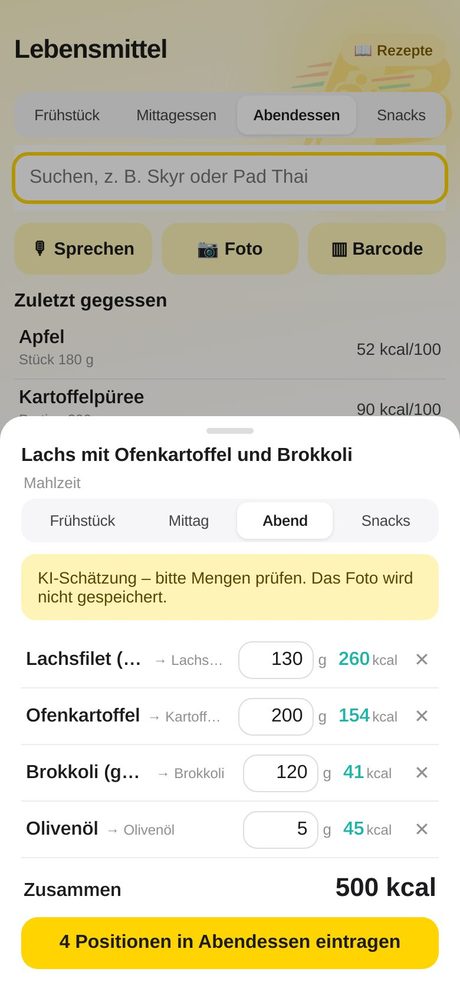
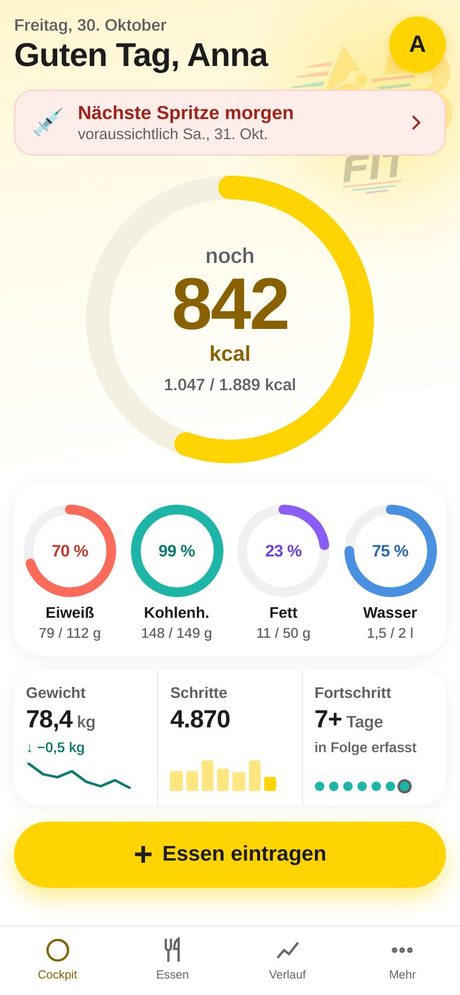
Log food by photo, voice or barcode. Track your injections. Photograph leftovers and see how many kcal you saved. On iPhone, Android and PC.
Web app – no App Store needed. Sample images with made-up data.
- 30+Features
- 6Languages
- 3Devices: iPhone, Android, PC
- 0Ads. 0 tracking.
Everything you need to stay on track
No patchwork of three apps. Food, injections, weight, water and activity in one place.
Injection log
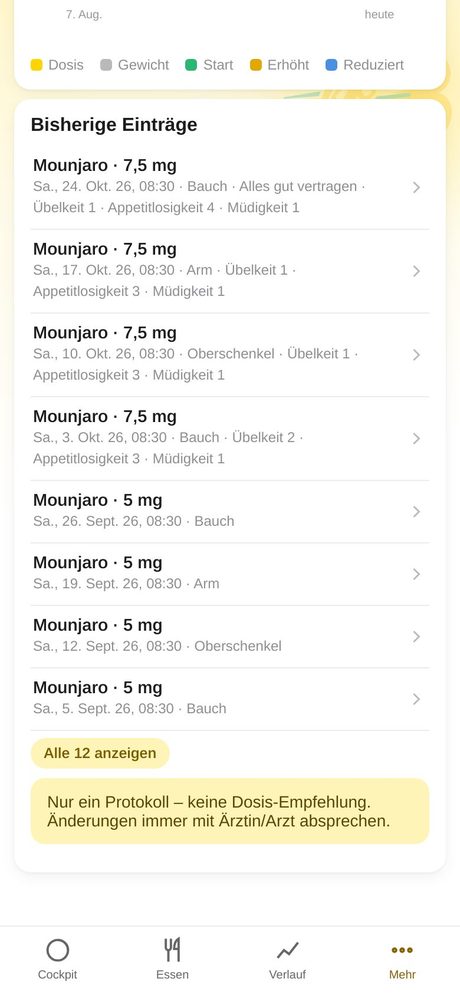
Log medication, dose, site and side effects. Dose curve with weight and your next date. A plain log – no dose recommendations.
AI photo recognition
Photograph your plate: the AI identifies the food and estimates amounts. You check and add it with one tap.
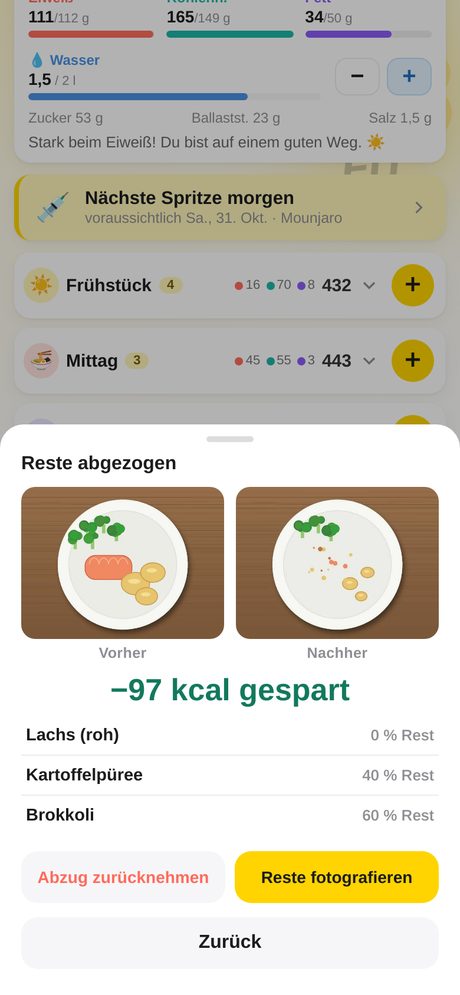
Photograph leftovers
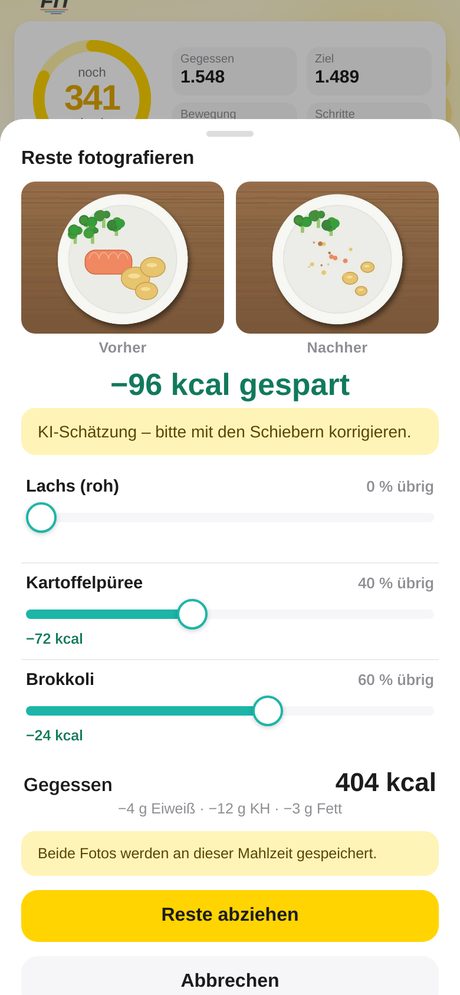
Before/after photo: the AI estimates what is left, you adjust with sliders. The saved kcal are deducted.
Barcode scan
Scan a package, nutrition values arrive automatically. Unknown? Photograph the nutrition table and the AI reads it.
Voice input
Say or type “two rolls with butter and a coffee” – ABfit matches it, you check.
Recipes
Paste a recipe or photograph one from a cookbook or screenshot. Nutrition per portion, straight into your diary.
Water
Log your drinks with one tap. It feeds into the day wrap-up and rating.
Weight & body fat
Curve from 30 days to “All”, trend, entry by hand or from Apple Health.
Steps & activity
Steps, active kcal and workouts – also by hand. Active calories raise your daily budget.
iPhone, Android & PC
One web app for all devices, same data everywhere. On your Home Screen like a normal app.
6 languages
Deutsch, English, ไทย, Français, Italiano, Español – switchable per account.
Personal support
Direct line to the developer: you write, a real person answers – fast.
AI rating
Have a day or meal rated: traffic light, grade, what went well and one concrete tip.
Apple Health sync
Steps, active kcal, weight, body fat and workouts automatically via Shortcut (iPhone).
Privacy first
No ads, no tracking, no selling data. Server in the EU. You can switch the AI features off.
Light & dark
Light, dark or automatic. Two columns on iPad and PC, sidebar on large screens.
Photograph leftovers: your plate shows what you really ate
Did not finish everything? Take a photo after the meal, the AI estimates the rest per ingredient, you adjust with sliders. Calories drop automatically – with “Undo”.
- Before/after comparison right at the meal
- “kcal saved” display
- Both photos stay in your account only
Injection log for GLP-1 medication
Record what you injected: product, dose, site, note and side effects. The curve shows dose and weight over time, the notice on the Cockpit shows your next date.
- E.g. Mounjaro – any product can be entered
- Dose curve with weight history
- A plain log – no recommendation, no advice. Always discuss dosing with your doctor.
ABfit compared with typical calorie apps
| Feature | ABfit | Typical calorie apps |
|---|---|---|
| Injection log with dose curve | ✓ Built in | usually not available |
| Recognise a meal by photo (AI) | ✓ Built in | partly available |
| Photograph leftovers, kcal saved | ✓ Built in | usually not available |
| Barcode scan | ✓ Built in | usually available |
| Voice input | ✓ Built in | varies |
| Recipe from text or photo | ✓ Built in | partly available |
| iPhone, Android and PC without App Store | ✓ Web app | often store app only |
| 6 languages (DE, EN, TH, FR, IT, ES) | ✓ Yes | varies |
| Ads and tracking | ✓ None | often ads or tracking |
| Support | ✓ Direct from the developer | often help centre or form only |
General assessment; individual apps differ and change. As of October 2026. ABfit statements match the feature overview.
Ready in 3 steps
Request access
Send a short email. You get your own login.
To your Home Screen
Open the link and choose “Add to Home Screen”. Done, no App Store.
Take a photo, done
Photograph your plate, check, log. The rest runs by itself.
Frequently asked questions
Do I need the App Store?
No. ABfit is a web app. Open the link and add it to your Home Screen – on iPhone via Safari, on Android via the Chrome menu.
Does ABfit also run on Android and PC?
Yes. In the browser on Android, Windows, Mac and iPad. You see the same data everywhere.
Is my data safe?
ABfit shows no ads and uses no tracking. Data is stored on the ABfit server in the EU. The AI features use Google Gemini and can be switched off completely per account. Details in the privacy policy.
Does ABfit give medical advice?
No. The injection log is a personal diary. ABfit recommends no medication and no dose. Always discuss changes with your doctor.
How accurate is the AI recognition?
It is an estimate. That is why you check every result and adjust amounts before anything is logged.
How do I get access?
By email to aalleexx@me.com. You get your own login.
Ready to stay on track?
Request your access and log your first meal by photo today.